|
EUROPEAN SOUTHERN OBSERVATORY

La Silla - Science Operation Department
|
Execution of HARPS calibrations
|
| Version: 1.0 2008-11-14 Gaspare Lo Curto
|
HARPS calibrations
Standard OBs for HARPS calibrations can be loaded directly from BOB
using the "Load from file" buttom.
Generally users only require to execute the standard calibrations.
Users aiming to achieve a signal to noise larger than 300 need to
increase substantially the number of flat field spectra. Currently we use 5
flat field spectra as a default. Up to 50-100 flats might be requested
in rare cases by the users.
IMPORTANT RECOMMENDATION:
the ThAr lamp "THAR1" or "lamp4" must stay on for the
minimum amount of time necessary.
Do NOT start the calibrations and leave the console.
Below is the sequence of actions to follow to run the HARPS calibrations:
- Check with the support or the visiting Astronomer which calibrations
are requested: HARPS, EGGS, or both.
-
If HARPS: load the following template from file (from the BOB panel):
HARPS_ech_cal_Standard_RV
-
If EGGS: load the following template from file (from the BOB panel):
HARPS_eggs_cal_Standard_RV
-
From the ICS panel turn on the lamps # 4 and 5.
They will go in the "Warmup" state (it takes 120s).
- Start the calibration template from BOB (this can be done while the ThAr
lamps are still in the "Warmup" state).
-
Once the first ThAr template is completed a pop up window will appear asking:
"Would you like to switch off the THAR1 lamp ?"
Answer: "No".
- The same message will appear once the second ThAr template is completed.
Wait for the HARPS pipeline to process all calibrations.
-
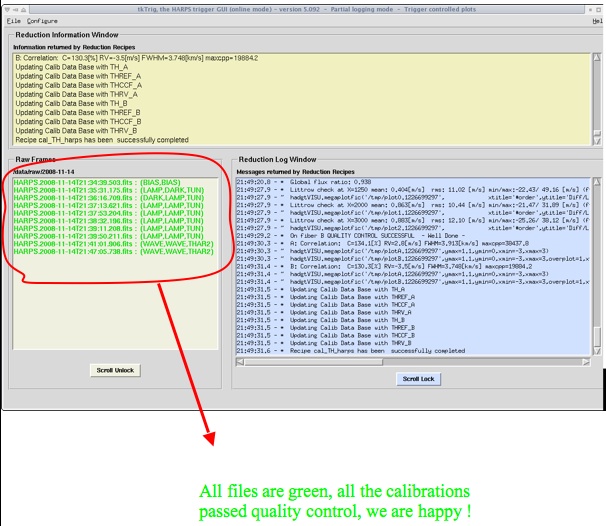
If all calibrations pass (filename bright green in the pipeline log window,
see figure below),
then switch off the THAR1 lamp (press "Yes" in the pop up window).
-
If one of the ThAr calibrations does not pass (filename in red or dark green
in the pipeline window) do NOT switch off the THAR1 lamp
(press "No" in the pop up window) and repeat it.
- If only the bias fails repeat only the bias.
- If one of the other calibrations fails (localization, flats)
repeat all the calibration OB.
-
If there is more than one hour before the start of the observations
set the instrumnet mode to "DARK" from the OS panel.