CCD Performance Monitoring
In a weekly base, EFOSC2, HARPS and CES CCD measurment have to be done by the day operator as follow:
- Do login to the corresponding instrument workstation
- Use the following table as a reference for light source, commands, modes and hints
Instrument |
EFOSC2 |
CES |
HARPS |
|---|
Light Source |
Beta Light on Grism wheel position 1(Free) |
Beta Light on
Shutter Unit |
Green LED Selected and Enable at the 360 Harps Lab. |
Panel Command |
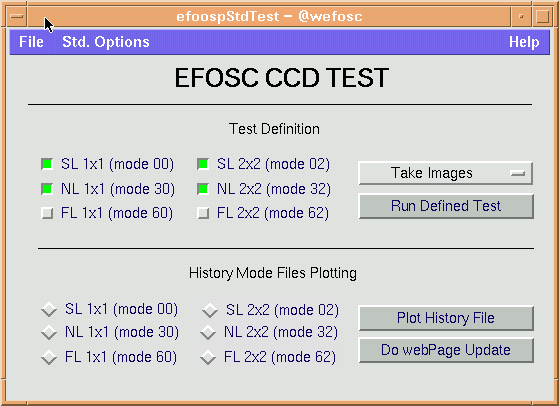
efoopsNewStdTest |
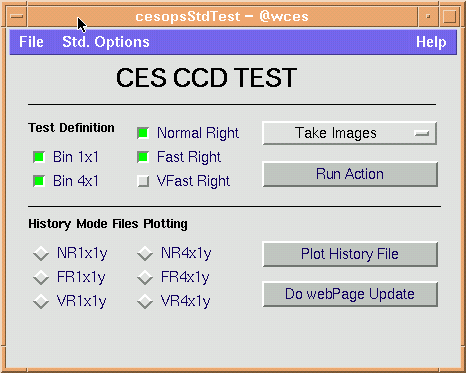
cesopsStdTest |
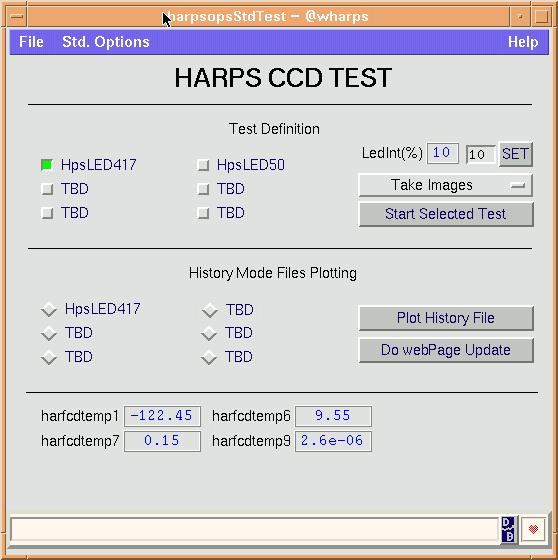
harpsopsStdTest |
Modos |
SL1x1,SL2x2
NL1x1, NL2x2 |
NR1x1y NR4x1y
FR1x1y FR4x1y |
F417 , F104 |
- For Efosc do instrument Setting from ICS panel before trying this test
- Always take an image as a test before starting this sequence.
- Remove from $INS_ROOT/SYSTEM/DETDATA directory any EfStd* or Ces* or HpsLED* file before the sequence start
|
- Once the light source is in, test images done and the corresponding panel open, define sequence by selecting CCD modes and binning options
- Press button Select Action to select Take Images then press button Run Action
All the images will be taken in a sequence of aprox. 1hours
- If there were no problems with the images sequence, press button Select Action to select Run Midas Procedure
then press buttonRun Action
Wait and check the results plots and prints. In case of big differences from the historic values call LIN-ODT.
WARNING:DO NOT RELEASE RESULTS OUT OF OPERATIONAL RANGES
- Define all the test with good results and press button Select Action and select Results Release
- Remove the Blight to the second floor storage and /or Switch OFF HARPS LED (unable).
- File all the prints in the corresponding CCD folder.